
Tour of the Chromium Continuous Integration Console
Chromium uses LUCI to run continuous builds and tests. The most useful is the Main Console. From the top section you'll see other consoles linked. Each can display its own console view. The Chromium Console shows the status of many tests. That Console shows a lot of information that can be hard to understand at first, so let's take a quick tour.
Basics
The LUCI service watches the git repository, telling machines in Swarming to start building and testing new revisions, and serves the "console" page that shows all the results. Every time a new revision is discovered, the scheduler triggers builders as each serve a different purpose. "Testing" builders are triggered when a "building" builder doing compilation archives its build. For example, all "XP Tests (dbg)(N)" and "Vista Tests (dbg)(N)" are triggered when "Chromium Builder (dbg)" is done archiving its build.
Builds
Let's take a look at the console page. For now, skip over the header (green, red, yellow, etc.) and the box at the top with lots of links and horizontal stripes (we'll come back to them later), and look down at the row of grey boxes with "changes" at the left. Those boxes show one column per builder.
The main console page shows only the builders, machines that build the executables and then distribute them to numerous machines to run various kinds of tests.
TODO: Everything below here is outdated.
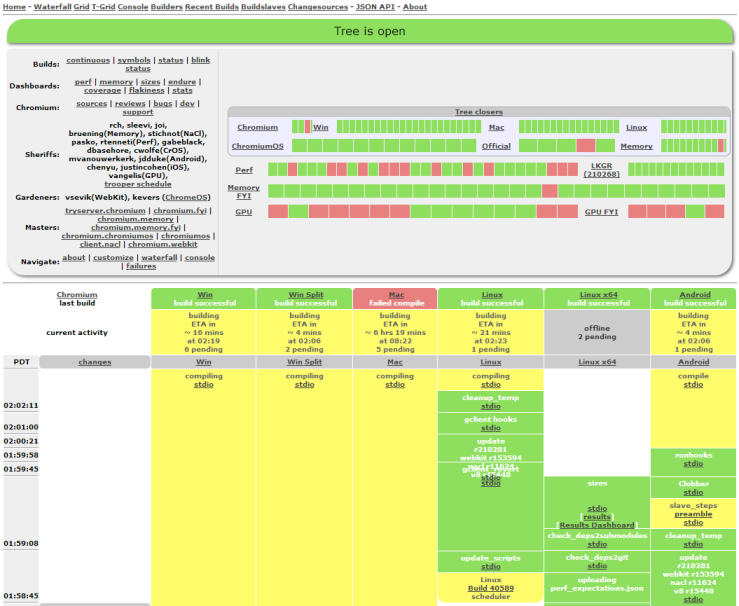
"Memory" builders run tests using ASAN to check memory correctness, "Perf" builders are running performance tests, and "GPU" builders run tests related to GPU usage. "Tree closers" automatically close the tree (preventing people from committing new changes) when they fail; "FYI" testers are considered less important, so failures there shouldn't close the tree.
Click on one of the platform names next to a row of colored boxes in the big grey box at the top, and then on "waterfall" at the left, to see the testing bots working on that platform, for example Windows. The set of builders changes pretty often, so any list we could put here would go out of date quickly, but the names are generally pretty good at describing what kinds of machines they are and what kinds of tests they're running. A "dbg" builder is running a Debug build rather than a Release build. Some machines both build and test, but "builder" machines only build the executables, then upload them to "tests" machines to run the tests.
Build Steps
Now look down one of the columns, starting at the grey box with the builder's name. Each box shows one step in that builder's build/test sequence, with the oldest one at the bottom and the current or latest one just below the name box. Just above the name box is the builder's current activity, and above that is the final result of the last build/test sequence that finished.
A yellow build step is still in progress, green finished successfully, red finished with errors, orange finished with warnings, and purple had an internal build error.
| Step name | Script | Description | When is it orange? | When it is red... |
| svnkill | taskkill | Kill any leftover svn processes before starting a new test cycle. | N/A | N/A; contact trooper |
| update scripts | gclient sync | Update the internal build scripts on the builder. | N/A | svn server failure; contact trooper |
| update | gclient sync | Update the checkout with gclient. This also runs the hooks like gyp to generate the make/vcproj/xcodeproj files. | N/A | svn server failure or DEPS breakage; contact trooper |
| taskkill | kill_processes.py | Kill a bunch of other possible leftover processes (test_shell.exe, ui_tests.exe, etc.) that would interfere with a clean run. | N/A | N/A; contact trooper |
| gclient_revert | gclient_safe_revert.py | Revert any changes if a checkout exists. | N/A | svn server failure or broken checkout; contact trooper |
| cleanup_temp | cleanup_temp.py | Remove any leftover temp files. | N/A | N/A; contact trooper |
| check deps | checkdeps.py | Ensure that source dependencies stay clean. It's done by parsing .cc and .h files according to rules to DEPS files. | N/A | A bad change; revert |
| compile | compile.py | Build the executables | N/A | A bad change; revert |
| archive build | archive_build.py | Save the executables and symbols into "snapshots" | N/A | N/A |
| extract build | extract_build.py | Extract an archive build on a tester from the corresponding "builder" | Failed to fetch the url requested. The last archived build is used instead. | Failed to fetch any build; the bot probably needs to be restarted, contact a trooper |
| (various tests) | runtest.py, debuger_unittests.py, chrome_tests.py, etc | See testing information | Only FLAKY_ tests failed | Tests failed; revert. |
| layout tests | webkit_test.py | Run html based tests from webkit | Tests marked as FAIL passed, no test unexpectedly failed. See test_expectations in layout test doc. | Unexpected layout test failure. It's usually related to a Webkit roll. |
| BVT tests | wait_for_bvt.sh and others | Run tests on actual ChromiumOS hardware | N/A | Tests failed or machine broke. |
| Reliability tests | reliability_tests.py | Run distributed tests to find non-deterministic crashes. It is green when only "known crashers" happens | Fails to grab the summary of the test runs for the expected build. | New stack traces appeared in crashes. |
If you click on the "stdio" link for a step, you can see the exact command that was run and the environment it was run in in blue, and any output it produced in black. stderr is in red. Most of the tests are pretty straightforward, but performance test output can be complicated at times. See the Guide to Perf Test Plots for more about that.
Builders vs Testers
A tester doesn't compile, so you can't clobber it. It simply extracts its build from a builder. Testers are triggered when the corresponding builder finishes.
Changes
Each time someone commits a change to the repository, the system notifies builders to start their build and test sequences. (If they're already busy, the change is queued, which means that more than one change is included in a single run if they're coming in faster than the builders can test.) The "changes" column at the left of the waterfall shows who committed a patch and when. If you hover over that link, you'll see a summary of the change; click on it to see a little more information. The times at the very left are in Pacific time. At the start of each run (that is, at the bottom of each series of steps for a build), there's a yellow box holding the build number. Clicking on that build-number link shows more information about the run, including in principle the "blamelist" of changes that went into it. Every now and then, though, that list of changes is off by one. If you need to know for sure, look at the results of the "update" step to see exactly what gclient sync pulled in.
Tree state
The "tree" is the sum of the various source repositories used to build the project, being Chromium, ChromiumOS, NativeClient, etc. In Chromium case, it's chrome/src/ plus everything listed in its DEPS file, and a bit more for Google Chrome like trademarked graphics. The tree can be "open", "closed" or "throttled". The normal state is open. When tests break, the tree is closed by putting the word "closed" in the tree status; PRESUBMIT.py checks the status and will block commits, and the build sheriff will act to fix the tree. When the tree is throttled, commits are only allowed with specific permission from the build sheriff, generally because the sheriff wants to make sure the tree is stable before opening it up to unlimited commits.
Seeing More and Seeing Less
Tucked away down at the very bottom of the waterfall page is a set of small links, of which two are particularly useful. The [next page] link takes you to the next screenful of the waterfall, which is backward in time to earlier builds. The [help] link, among other things, shows you a list of all the bots attached to this waterfall. You can choose which ones you'd like to see, then bookmark the resulting URL so you can get that view easily next time.
Banner and Box
Now back to the top of the waterfall. At the very top is a banner showing the current state of the tree. If the tree is closed because of build or test failures, it should be mentioned here. If there's an announcement about a new build process, expected downtime, or some other aspect of Chromium development, it'll generally be shown here, too. Below that is an oval box. It has a number of handy links at the left -- try them to see where they go. It also has four rows of colored boxes, which show the pass/fail status of the last completed runs for several categories of builders. If you click on one of those category names, you'll go to a partial waterfall view that shows only the related builders. Hovering over a colored box shows you the name of the builder it's summarizing, and clicking on the box will go to a waterfall view with only that one builder.
Sheriffs
The last thing in the oval is a list of this week's build sheriffs. Although every developer is responsible for running tests before committing patches and watching the tree for problems afterward, the sheriffs have overall responsibility in case someone else is away or not paying attention.
Sources
Most of the source for Chromium's builder setup is found in the chromium/tools/build Git repo.
Adding new build configurations and tests to the main Chromium waterfall & Commit Queue
Since every additional configuration that closes the tree has a cost for all the developers to maintain it, there are some guidelines for adding new bots to the main waterfall and commit queue:
- all the code for this configuration must be in Chromium's public repository or brought in through src/DEPS
- setting up the build should be straightforward for a Chromium developer familiar with existing configurations
- tests should use the existing test harnesses
- it should be possible for any committer to replicate any testing run; i.e. tests and their data must be in the public repository
- cycle time needs to be under 40 minutes for trybots
In addition to the above requirements, configurations need to catch enough failures to be worth adding to the commit queue, because running builds on every CL is expensive. If a configuration only fails once every couple of weeks on the waterfalls, it's probably not worth it to add it to the commit queue.
If a configuration has tests that depend on code in other repositories, then it could have its own LUCI project. The team responsible for a separate configuration would sheriff that separate tree. Teams would generally find it more maintainable to have a configuration on the main Chromium tree that observes the above guidelines, even if it only contains a subset of the full code and tests. Whenever a regression is found that only reproduces on the separate team's LUCI project, the separate team's goal should be to write a regression test that runs on the main Chromium waterfall to catch those failures in Chromium, too.
Please email dpranke@chromium.org to sign off on new build configurations.
When adding new tests for existing build configs, see Adding new tests to the Main Waterfall.
Builder setup
For some builders, there exist no trybots. In order to debug compile failures, you need to setup a similar compile environment locally:
Other views
The console view is the default one. Marc-Antoine is also looking for people willing to use the json interface to create a cool live interface in Javascript. Contact him for more details.
Glossary
It's important to use the right words so here are the official definitions:
- builder: a column in the waterfall or console view, doing a series of build steps. The build steps involve compiling and/or running tests.
- bot: an actual machine (often a VM) connected to a builder. In the case of the try server, multiple bots are connected to one builder. In general there is a 1:1 mapping between a bot and a builder so they can usually be used interchangeably.
- build step: a shell invocation like compile or update sources. Each builder has a determined series of build steps that are executed on the bot.
- "a tester": a builder that only runs tests, it gets its binaries from the extract step.
- "a builder": a builder has a double-meaning, it can be any builder but also only builder that compiles code but does not run tests.
- "an incremental builder": a builder that does incremental compiles.
- "a full builder": a builder that does full compiles, it does a clobber on every compile (deleting all build products), starting fresh.
- clobber: the act of doing a full builder, versus an incremental build. E.g.: rm -rf out; make